You Can Now Add Payees in Bill Pay Using Mobile App
Using Bill Pay in your mobile app just got a little easier and more convenient. You are now able to set up a payee in Bill Pay while using your mobile app instead of having to log into your online banking account on a desktop computer. The new feature on the Dort Federal Credit Union app cuts out the hassle of having to use a desktop computer and is valuable to those who are always on-the-go.
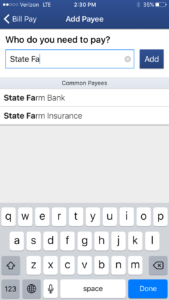
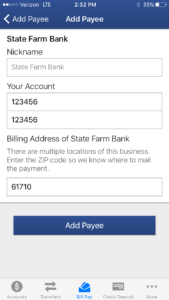
You need only to log into your mobile app, select “Bill Pay,” then click on “make a new payment” and you will then be able to choose to add a new payee. Payees that are most common will be selectable in a list when you start typing in a payee name. If the payee name is not selectable in a list you can still finish typing in the name and finish the process by filling out the corresponding payee information. The new payee information will then be saved for future reference and you will be able to pay your bills in the future using the mobile app and online banking.